What I learned Vibe Coding a SC2 Bot - Things to Copy

I vibe coded a full Terran bot from scratch. Let the LLM take me with the vibes.

In the video I walk through the whole journey, from picking the right LLM to putting the bot on ladder. Below you’ll find the stuff I couldn’t fit in the video.


Quick Recap

Four models. One prompt each. Build a micro bot with stutter-step, focus fire, and ARES framework usage.

  • Grok code fast 1: Fast, sloppy, used the framework. Best micro performance.

  • Claude 4.5 Sonnet thinking: Searched docs first, most accurate code. Weakest in testing.

  • GPT-5 Codex: Slow, chatty, didn’t use the framework.

  • Gemini 2.5 Pro: Started strong, fell apart on unit IDs, then started apologizing.

Grok won the micro test.

Claude took over for the full macro bot and cleaned house.

Takeaway: Claude is way better at coding bots with


The Prompts I Actually Used

Here’s the exact prompt I gave each model for the micro bot test:

You’re coding a StarCraft 2 bot using Python sc-2 and the Ares Framework, look up and understand how both of those things work before you start. This is a Terran bot, that only is focusing on micro, you only need to code micro maneuvers, you will control tier 1 Terran units including SCVs only. Control ranged units to attack move towards the enemy and when the enemy is near form a concave, to stutterstep back when their weapon is on cooldown and use flexible focus fire.

And for the full macro bot:

You’re coding a StarCraft 2 bot using Python sc-2 and the Ares Framework, look up and understand how both of those things work before you start. This is a Terran bot, that will be doing the 1-1-1 opening strategy, then will use a flexible approach as outlined in the Bronze to GM document attached. Review the [PLAN] thoroughly and we’ll be taking it section by section checking off as we go. Don’t attempt to do the whole thing in one go. Use as many ARES functions as possible without resorting to creating your own solutions, unless it doesn’t exist.

The key difference? Section by section. When I let Grok do the whole plan at once it went off the rails. Forcing it to stop and check in after each section was night and day. Claude thinking didn’t need to be told.

The Build Order YAML

This is the exact build order config I fed the bot. If you’re running ARES with a build runner, you can drop this right in.

OneOneOneStandard:
    ConstantWorkerProductionTill: 42
    PersistentWorker: False
    OpeningBuildOrder:
        - 13 supply @ ramp
        - 15 barracks @ ramp
        - 15 gas
        - 16 gas
        - 0 reaper
        - 0 orbital
        - 18 factory @ ramp
        - 0 reaper
        - 19 supply @ ramp
        - 20 expand
        - 20 hellion
        - 20 starport
        - 20 barracksreactor
        - 20 supply
        - 20 factorytechlab
        - 20 siegetank
        - 20 starporttechlab
        - 20 gas

The Rules File

In the video I mentioned writing rules. Here’s what I put to keep the LLM tamed

Global rules:

  1. Don’t over-engineer. Solve the problem simply.

  2. Fix the actual problem. No workarounds, no new patterns stacked on top.

  3. Stay in your lane. Only work on the current task.

  4. Suggest solutions I haven’t thought of. Don’t just implement them.

  5. Give a short report of each change and its effect when you’re done.

SC2-specific rules:

  • Use ARES framework functions whenever possible

  • Read python-sc2 and ARES documentation before writing new code

  • Reference attached open-source bot examples

  • Commit after each completed feature

2023 File I fed the LLM:

PiG’s Terran B2GM 2023.md (43.9 KB)


Hope this helps

Let know your vibe coding experience, or if you’re using it what’s working for you

Sorry, havent had chance to watch video yet, but looking at your summary, didn’t see you mention costs.

Do you have an idea of the # of tokens needed for the experiment? Or cost to use the LLMs?

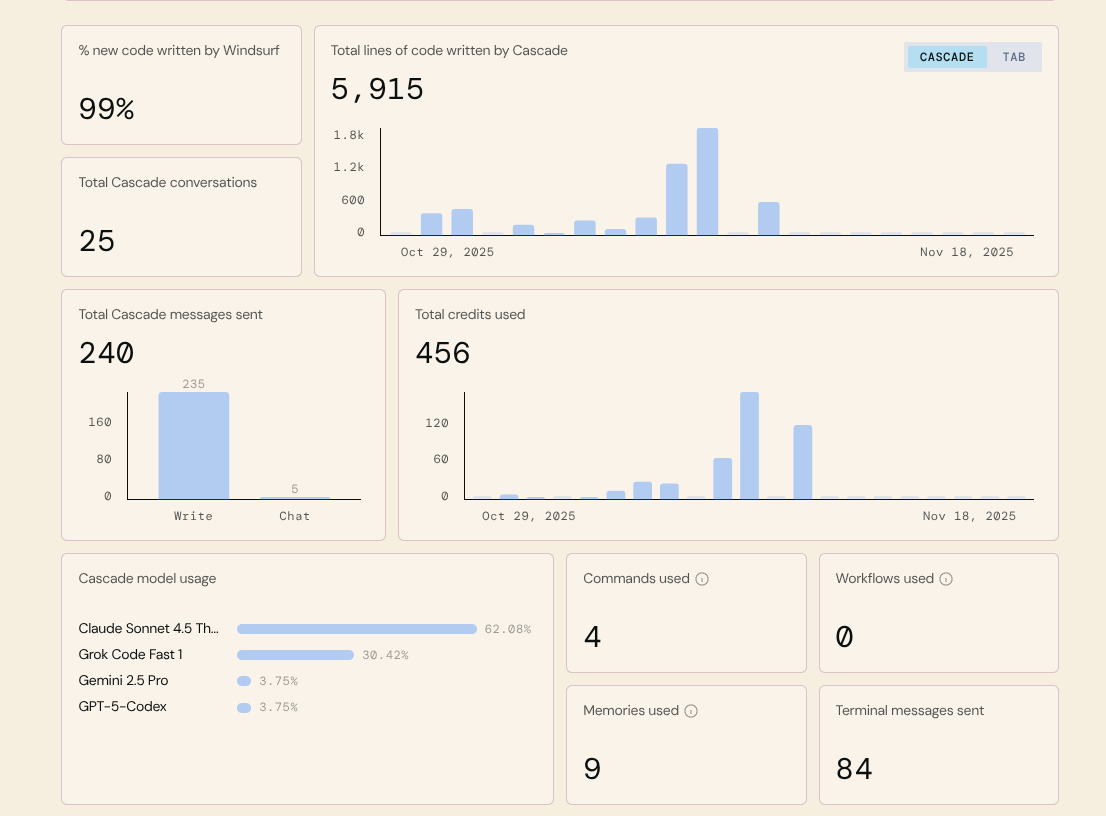
So I have a windsurf subscription that gives me 500 credits a month and this combined experiment my credit usage looked like this:

it skews to Claude because ultimately what I ended up using in the end to do the macro bot. It was the most efficient overall with less errors though GPT Codex was also pretty good too but slow (though I hear that’s fixed in 5.3) .

I have since used Opus 4.5 thinking and find it ultimately the best but the credit cost can be pretty steep.

I’m experimenting with using Cursor, and also my openclaw bot for development.

I don’t want to spend $100 a day on tokens.

Still trying to figure out what mix of models to use with openclaw so it could do some of the work, while not spending all my money.

Tokens for Opus or even Sonnet are quite expensive, and scary to think the companies are seemingly subsidizing the actual cost when using subscriptions.

Seems pretty clear tokens will only get cheaper, just have to find an cost reasonable approach that is productive, yet not crazy expensive along the way.

I heard on one podcast they estimated the cost developers at Anthropic could be using in their workflows could be 10 - 100x the cost of a max ($200/month) subscription

I’ll actually break down more of token solution in my post talking about my Openclaw, but right now my current solution is a separate rig with GTX 2050 /w 11 GB of VRam so it doesn’ t let me run anything to extreme, but I am going to do some tests with a distillation layer by passing it through another model in order to make the answers of a smaller model better and accurate.

As for IDE, Windsurf lets you bring your own keys from Anthropic which I am strongly considering because I think that might be better than the flat subscription.

the other solution could be of course is running a stronger model on Digital Ocean or AWS which may be more cost effective, but require some overhead in managing.

Here is my method for vibe coding a entire project like this from scratch (it will not be perfect) you will need to test it, work on changes with the LLM.

Some lower cost solutions:

  • Google AntiGravity (Gemini 3/Sonet 4.5/Opus 4.5) - Has a free tier
  • OpenAI Codex w/ GPT-5.3-Codex - 20$ month plan should be plenty to get you going

There are other options out there. Here is the prompting structure I use when creating a entire project, the plan is created by Chat GPT.

```

PROMPT: 1
This will create a documentation in AI’s own format for the Ares framework helping it to understand what already exists.

We are working on creating a StarCraft 2 bot using the Ares Framework. The first thing we need to do is create a easy to use documentation file for the methods, properties, functions, and abilities of the ares framework. Create a ARES_DOCS.md file that you can easily reference later to quickly gain information on the usage of ares.


PROMPT: 2
CLEAR CONTEXT - This step makes the plan, may need to modify what you want in it

About You

You are a professional StarCraft 2 Bot developer.

  • Do not over complicate things but make the code effective and efficient.
  • Leverage the Ares framework where you can.
  • Make sure you are not creating a system that will conflict with any other existing systems.
  • Write high quality professional code like a real developer.

General

Project Name: Codex SC2 Bot
Description: A competitive starcraft 2 bot written in python using the ares framework.
Plays: Terran

Temp/Explainer Files

Remove and debug/temp files we make in the process of testing.

Framework Info

Ares-first micro/macro architecture, review ARES_DOCS.md for any information you may need about ares.

Task

We have locally cloned the ares sc2 starter bot repo. We want to turn this into a highly competitive Terran bot for the AI Arena Ladder.

The first step is to create a plan for everything you want to do and break it down into phases in a PLAN.md file. It should contain every aspect of the bot think fully through your implementation and do any research you need too.

Here is some ideas:

  1. CORE ARCHITECTURE / GAME LOOP
    ========================================================
    Main loop orchestration
  • on_step pipeline
  • System update order and priorities
  • Action commit / throttling
  • Phase switching (early → mid → late game)

System scheduler

  • Conflict resolution between systems
  • Priority stack (defense > survival > macro > scouting > offense)

Configuration layer

  • Per matchup tuning
  • Per map tuning
  • Thresholds, ratios, timers, toggles

========================================================
2) GAME STATE + MEMORY SYSTEM

Self state tracking

  • Owned units and structures
  • Units in production
  • Supply, income, tech progress
  • Active upgrades
  • Base count and saturation

Enemy memory model

  • Last seen enemy units/structures
  • Fog-of-war memory
  • Estimated enemy tech path
  • Estimated army value and composition

Threat representation

  • Ground threat map
  • Air threat map
  • AoE danger zones (storm, bile, nuke, etc)
  • Base danger levels

========================================================
3) MAP KNOWLEDGE & PATHING

Map analysis

  • Expansion locations
  • Choke points
  • High ground / ramps
  • Dead air space / drop zones
  • Rush distance
  • Attack lanes

Pathfinding system

  • Safe pathing vs fastest pathing
  • Retreat pathing
  • Drop flight paths
  • Rally path planning

========================================================
4) SCOUTING & INTELLIGENCE SYSTEM

Scout scheduling

  • Early worker scout
  • Reaper scout paths
  • Scan timing
  • Drop scouting
  • Watchtower control

Enemy strategy detection

  • Early rush detection
  • Expansion timing detection
  • Tech structure detection
  • Cloak detection
  • Air tech detection

Strategic reaction planner

  • Adjust production vs enemy comp
  • Defensive posture selection
  • Tech switches

========================================================
5) MACRO ENGINE (ECONOMY + PRODUCTION)

Economy manager

  • SCV production rules
  • Mineral/gas saturation targets
  • Gas timing logic
  • Worker safety / pull logic
  • Mule usage

Expansion manager

  • Expansion timing logic
  • Expansion priority selection
  • Planetary vs Orbital decision logic

Production manager

  • Barracks/Factory/Starport scaling
  • Production facility add-ons (Tech Lab vs Reactor)
  • Rally point management
  • Production queue prioritization

Unit composition manager

  • Army composition goals
  • Dynamic comp switching vs enemy
  • Supply planning
  • Reinforcement routing

Upgrade manager

  • Infantry weapons/armor
  • Vehicle weapons/armor
  • Ship upgrades
  • Stim, combat shields, concussive shells, etc
  • Engineering bay timing

========================================================
6) UNIT ROLE SYSTEM

Worker roles

  • Mineral workers
  • Gas workers
  • Repair workers
  • Scout workers
  • Pull workers (defense)

Combat unit roles

  • Main army units
  • Defensive units
  • Harassment units
  • Drop units
  • Air superiority units
  • Spell/utility units

Special unit roles

  • Ravens
  • Medivacs
  • Ghosts
  • Widow mines
  • Liberators

========================================================
7) SQUAD MANAGEMENT SYSTEM

Squad creation

  • Main army squad
  • Natural defense squad
  • Harassment squad
  • Drop squad
  • Anti-air squad
  • Counterattack squad

Squad lifecycle

  • Squad creation / merging / splitting
  • Reinforcement routing
  • Rally logic
  • Retreat logic

========================================================
8) COMBAT DECISION SYSTEM (TACTICS)

Engagement decision engine

  • Fight vs retreat logic
  • Army strength comparison
  • Terrain advantage evaluation
  • Reinforcement distance evaluation

Attack planning

  • Attack timing selection
  • Target base selection
  • Multi-prong attack planning
  • Contain vs all-in decision

Target selection

  • Priority targets by unit type
  • Structure targeting rules
  • Focus fire logic

========================================================
9) MICRO SYSTEM (UNIT CONTROL)

General micro

  • Stutter stepping
  • Kiting logic
  • Formation control
  • Concave creation
  • Surround avoidance

Unit-specific micro

  • Marine/Marauder stim timing
  • Tank siege/unsiege logic
  • Widow mine burrow/unburrow logic
  • Viking mode switching
  • Liberator zone placement
  • Ghost EMP/Snipe logic
  • Raven abilities (matrix/turret/interference)
  • Medivac pickup micro
  • Drop unload micro

Spell and ability avoidance

  • Dodge storms, biles, disruptor shots
  • Split vs AoE

========================================================
10) TERRAN-SPECIFIC SYSTEMS

Orbital command manager

  • Mule timing and targeting
  • Scan usage logic
  • Supply drop usage

Repair system

  • Repair priority list
  • SCV pull for repair
  • Emergency repair during fights

Add-on management

  • Tech Lab vs Reactor allocation
  • Add-on swapping logic

Lift-off / building repositioning

  • Floating buildings for scouting
  • Saving buildings during base trades
  • Wall raising/lowering

========================================================
11) HARASSMENT & DROP SYSTEM

Harass planning

  • Drop timing logic
  • Harass target selection
  • Widow mine drop logic
  • Hellion runby logic
  • Liberator harass logic

Drop execution

  • Drop squad creation
  • Path planning
  • Pickup retreat logic
  • Multi-drop coordination

========================================================
12) BASE DEFENSE SYSTEM

Threat detection

  • Drop detection
  • Runby detection
  • Cloaked unit detection
  • Proxy structure detection

Defense response

  • Squad reassignment
  • Worker pulls
  • Static defense construction
  • Scan usage for defense

========================================================
13) EARLY GAME BUILD ORDER SYSTEM

Opening build executor

  • Scripted opener execution
  • Transition to dynamic macro
  • Matchup-specific openings

========================================================
14) STRATEGY LAYER (HIGH LEVEL AI)

Game plan selection

  • Macro vs aggressive vs timing attack
  • Tech path selection
  • Win condition planning

Adaptive strategy

  • Midgame pivots
  • Late game transitions
  • Counter-strategy selection

PROMPT 3+:
CLEAR CONTEXT - Repeat this step for each phase, testing the bot between each phase making sure there is no errors.
If you try to do all the steps the context will get too long, once you exceed context length things get really dumb and the code gets worse.

About You

You are a professional StarCraft 2 Bot developer.

  • Do not over complicate things but make the code effective and efficient.
  • Leverage the Ares framework where you can.
  • Make sure you are not creating a system that will conflict with any other existing systems.
  • Write high quality professional code like a real developer.

General

Project Name: Codex SC2 Bot
Description: A competitive starcraft 2 bot written in python using the ares framework.
Plays: Terran

Testing

To test the bot you can use `.venv\Scripts\python.exe run.py`

Temp/Explainer Files

Remove and debug/temp files we make in the process of testing.

Framework Info

Ares-first micro/macro architecture, review ARES_DOCS.md for any information you may need about ares.

Task

We are working on our detailed plan in PLAN.md we are currently on Phase {PHASE_NUMBER_HERE}. Please complete this phase and make it as complete in our PLAN.
```
1 Like

Appreciate you posting this. So you’re using Codex, how are you using Codex (I assume it would be the same with Claude Code) to enhance the workflow?

Cause I am finding that AI in my IDE have been pretty good, I saw codex has released a standalone app and I put it on my todo list to explore it more. What are you finding?

I personally like the CLI tools but there are several great alternatives:

Claude Code (CLI/Extension), AntiGravity (has a free tier) (IDE), Codex (CLI/Extension, I have not tried the new desktop app yet), KiloCode (Paid with some Free Models) (CLI/Extension), and CoPilot (Extension) (I think there’s a limited free tier not sure on the models though).

One of the main things to remember about all theise tools is they all have Per-Token limits so you want to focus on keeping then number of tokens down. My favorite way to do this is always clearing the context (starting a new conversation) between each feature so were not passing in hundreds of thousands of tokens with every request this will make that per token limit last alot longer. While yes you may need some of the same files, you will not need all the logic and thinking that made those files and AI has a great capability to quickly search parts of a code base it needs.

I recommend following a standard clear prompting structure (like I use in the final prompts above) to pass along all important information that it will need for EVERY task (frameworks, tech stacks, general project description, testing methods, and current task).

All of these tools bring their own pricing structures, tool sets and features but all of them are capable of building at least a basic bot, helping you debug issues, creating in-game debug UI’s, etc. Its all about using tokens smartly and giving the LLM’s clean/clear messages with exactly what you want.

One pro tip: Having trouble thinking of all the details for a feature? Go to chatgpt (or another large model with search/reasoning) and ask it `Do research on (insert topic here like Reaper Micro) help me create a full PRD for this feature for our Starcraft 2 bot based on the X framework. Wrap the PRD in code tags so I can copy and paste it. Ask any questions you may have before creating the PRD.” It will output a entire plan for that feature with as much detail as it can find then you just need to prune out the things you don’t want, paste it in and watch it go to work.

Terms:
CLI = Command Line Interface (things you use through the terminal)
IDE = Integrated Development Environment (code edit think VSCode)
Extension = Extension for VSCode
PRD = Product Requirements Document

1 Like

blog posts mentioned:

I think this interview with the openclaw creator really good breakdown the experience. I am not sure if I am ready for full CLI experience without the IDE but I am thinking of things in his workflow I want to incorporate.

I am going to start I think with using the microphone more often. I feel like I could get so much more if I just talked to it BUT I don’t know how to get context involved with that… I am guessing I should just trust the AI to go find the context if I just reference it instead of tagging

I wanted to add my own rules for guiding the LLM


SC2 AI Bot Development Rules

  • You are a StarCraft II AI Bot developer using python-sc2 (Burny) + ARES.
  • Integrate with existing ARES conventions; keep logic deterministic and cheap (frame-time safe).
  • Favor simple, data-driven heuristics over heavy abstractions.
  • Don’t change strategy/builds unless asked. Scope to the task.
  • Creativity policy for SC2: You may propose at most 2 gameplay ideas under Suggestions:
    (e.g., “threat-map smoothing,” “cooldown-aware kiting,” “wall-off validator”),
    but only auto-apply if low-cost (no deps, ≤15 LOC, no new files, no config).
  • Performance guardrail: avoid per-unit O(n²); target O(n log n) or batched ops.
    Emit a 1-line perf note if you add any loop over units.

Bot Data & Performance

  • Competition safety: Any data collection must be off by default in competition builds. No blocking I/O in the game loop.
  • Async + batched I/O: Buffer logs/metrics; flush asynchronously outside the frame-critical path. Never do per-unit disk writes.
  • Replay & memory files: Store under data/ with run-stamped folders. Include map, opponent_race, build, commit, seed.
  • Deterministic runs: Persist and log the RNG seed for each match; provide a simple command to re-run a match with the same seed.
  • Schema/versioning: Tag all bot “memory”/knowledge files with schema_version. Add a migrator when changing format.
  • Corruption handling: On load failure, fall back to safe defaults and emit a single, clear error (no crash loops).
  • Frame-time budget: Any data read/write must be ≤ your per-frame budget (target sub-millisecond). If exceeded, degrade gracefully (drop sample, defer write).
  • Sampling policy: In dev, default to sampled telemetry (e.g., 1 in N events) to avoid I/O storms. Make N configurable.
  • Feature gating: Guard new data features with a config flag (data.enable_*). Flags must default to off in competition.
  • Storage caps: Enforce rolling caps (e.g., max replays per run, max MB for memory/metrics). Oldest-first eviction.
  • Validation: Validate memory/knowledge files at startup (keys present, value ranges sane). Refuse to load if unsafe.
  • Explain when useful: If adding a new dataset/metric, provide a 2–3 sentence note: purpose, collection rate, and read path.

Acceptance Criteria for Data Tasks

  • No blocking I/O in frame loop; async/batched writes only.
  • Deterministic: seed + config + commit hash recorded with outputs.
  • Schema versioned + validation on read; safe fallback on failure.
  • Competition-safe defaults (collection off; flags documented).
  • Storage/sampling caps documented and enforced.

Testing behavior

  • before trying to do python run.py , you need to use "$env:SC2PATH=“D:\StarCraft II” for the path

Example Behavior

Task: “Add safe path helper that avoids enemy splash zones.”

Suggestions:

  1. Why: 10–20% fewer probe losses in early game. Cost: +1 (one helper fn). Plan: Precompute splash circles, inflate with 0.5, mark blocked grid. Auto-apply: Yes (≤15 LOC).
  2. Why: Slightly better mining uptime via smarter retreat. Cost: +2 (new file). Plan: Micro policy table. Auto-apply: No (needs approval).

Then it implements the first only, with tests, and lists the second under Backlog:.


But I am actually going to implement explaining things like the state to the LLM that @liquid ‘s example suggests I hadn’t thought about that

@liquid have you ever done a Ralph Loop with your bot?